
Room checklist · iPhone · Free
A calm way to check your room.
PrivacySweep walks you through a careful look at a hotel room or short-stay rental, and keeps a private record of what you checked.
Work through the checklist at your own pace, take an optional 30-second look at what nearby devices announce, and add notes and photos that stay on your phone. No account. No adverts. No tracking.

The problem
You arrive somewhere new, tired, and a story you once read comes back to you. Most advice online is either a scare or an app that shows a red radar and a "threat score". Neither is honest. A phone cannot prove a room is clear, and an app that pretends it can leaves you worse off than a careful look with your own eyes.
PrivacySweep gives you that careful look as a short, ordered checklist, plus the few things a phone genuinely can show you, each with a plain explanation of what it does and does not mean. At the end you have a record of what you checked, which is useful if you ever need to raise something with the property.
What it does
A checklist and a note-taker first. Everything else is optional.
-
A guided room checklist
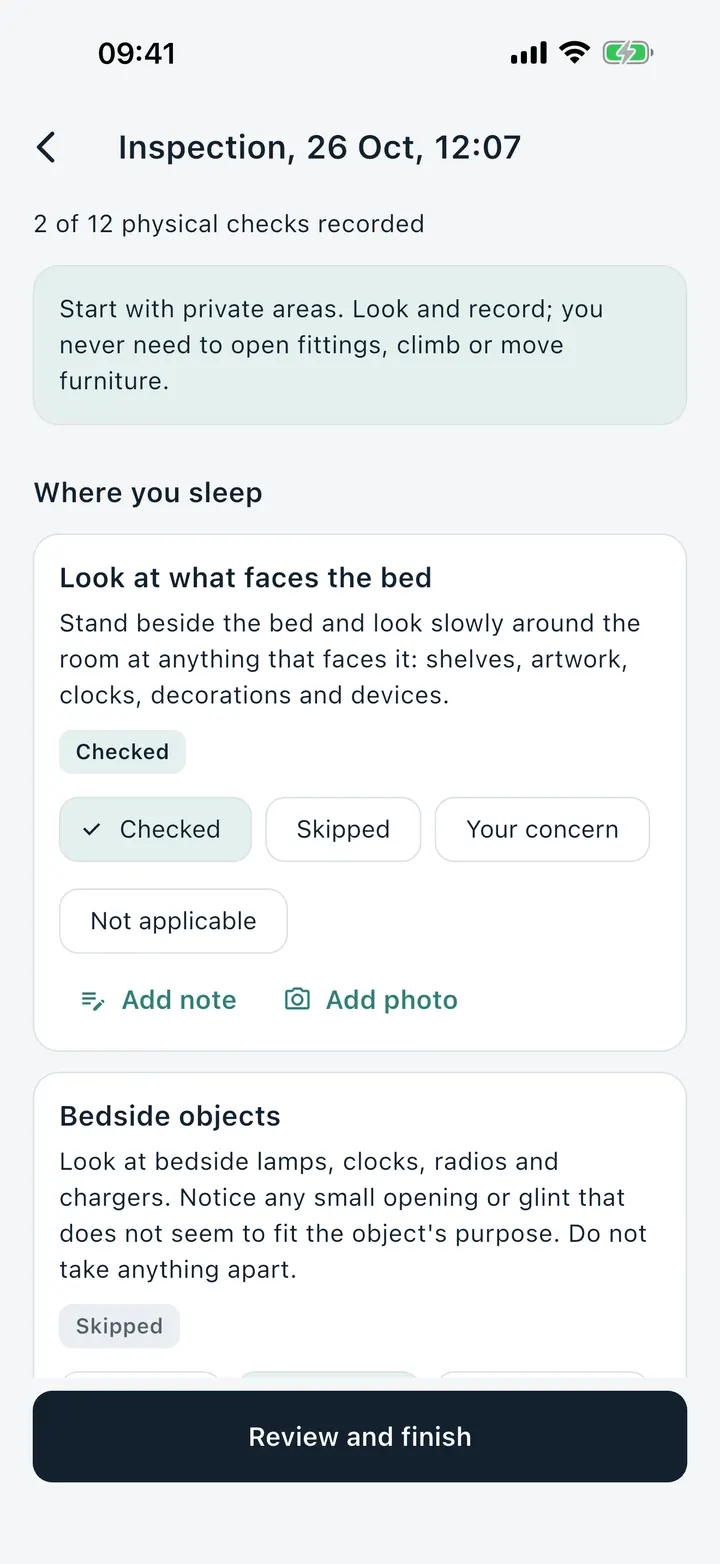
A quick checklist of 12 checks, about 5 to 10 minutes, or a full one of 30. It starts where it matters most: what faces the bed, the shower and the place you change. Mark each check as checked, skipped, not applicable or your concern.
-
A 30-second Bluetooth look
Optionally, list the Bluetooth Low Energy advertisements your phone can hear nearby, with any name a device supplied and when it was last seen. PrivacySweep never pairs with or connects to anything.
-
A look at the room network
On a network you are allowed to inspect, list the devices and services that announce themselves on it, for up to 30 seconds. It reads what they broadcast and never signs in to anything.
-
Lights-off camera aid
A camera preview to help you look for yourself: the front camera for infrared dots, or the back camera and torch for lens glints. It does not analyse the picture and stores nothing.
-
"Looks like", never "is"
Each observation shows the raw facts and, separately, what it looks like and why that is not proof. A Bluetooth name could be headphones, a television or a neighbour's phone.
-
Walk towards a signal
Pick one Bluetooth advertiser and a bar follows its signal strength while you move, with "getting warmer" and "getting colder". No distance or direction is claimed.
-
Notes, photos and your own labels
Add a note or a photo to any check, and label an observation "my headphones" so you can see what is left. Photos stay inside the app.
-
A record you can share
The summary lists what you checked, skipped and could not run. Export it as text after a preview. Device names and photos stay out unless you switch them on.
How it works
Three steps, and you can stop at any of them.
-
Start an inspection
Name the room if you like, then pick the quick checklist or the full one.
-
Work through the room
Follow each check, starting with private areas. Mark it, add a note or photo, and run any of the optional looks.
-
Review and finish
See what you checked, skipped and could not run. Save it on your phone, export it as text, or delete it.
What it cannot do
I would rather tell you plainly than sell you a scare. An inspection record shows what you checked and what your phone observed. It cannot show that nothing is there.
- It cannot reliably detect offline audio recorders or arbitrary radio transmitters.
- It does not detect hidden cameras, and it cannot tell you that a device is recording.
- It does not certify a room safe, and it never shows an all-clear.
- Each look only sees what chose to announce itself to your phone. Many devices never do, so an empty result means nothing was announced, not that nothing is there.
For higher-risk situations, a specialist assessment may be appropriate. The manual has the full list.
Private by design
- No account and no sign-up.
- Inspections, notes and photos stay on your phone and are kept out of device cloud backups where the system allows.
- No adverts, no analytics, no tracking and no sale of data.
- The microphone is never used. Other permissions are asked for only when you start the look that needs them.
- The checklist works with no connection at all, including in aeroplane mode.
Read the full privacy policy.
Price
Free
Every feature, with no in-app purchases, no subscription and no adverts.
Questions
How can I check a hotel room or short-stay rental with my phone?
PrivacySweep walks you through it. Its quick checklist has 12 checks and takes about 5 to 10 minutes, starting with what faces the bed, the shower and the place you change. Optional short looks list the Bluetooth devices and room network services that announce themselves to your phone, and you keep a private record of what you checked. It is free, on iPhone.
Is this a hidden camera detector?
No. PrivacySweep is a checklist and a note-taker first. The optional looks list what nearby devices announce about themselves. They cannot tell you whether anything records, and the app says so on the first screen, in the summary and in every export.
How much does it cost?
Nothing. PrivacySweep is free, with no in-app purchases, no adverts and no account.
What does the Bluetooth look actually do?
For up to 30 seconds, while the app is on screen, it reads the Bluetooth Low Energy advertisements your phone receives. It does not pair, connect or transmit, and it stops when the time ends, when you tap Stop or when you leave the screen.
Can I use the network look on any Wi-Fi?
Only on a network you are allowed to inspect, such as the one provided for your own room. The app asks you to confirm that before it starts. It only listens for standard announcements. It never tries passwords, never opens a video stream and never sweeps for open ports.
What if a look shows nothing?
It means nothing announced itself to your phone during that look. Many devices never announce themselves, so it is not an all-clear.
Does anything leave my phone?
Nothing is sent to us. There is no account, no analytics and no server of ours. Inspections, notes and photos stay on your phone until you delete them or choose to share an export.
What should I do if something worries me?
Mark it as your concern, write down what you saw and, if you wish, take a photo. Do not open or take anything apart. You can leave the room, contact the property or your booking platform, and in the UK call 101, or 999 in an emergency, if you have concrete evidence of recording. PrivacySweep never contacts anyone for you.
Get PrivacySweep
Questions or feedback: send us a request, or email support@overpass.co.uk. PrivacySweep is made by Overpass Limited, a small UK software company.